Manual personalization reports
Start with a different question
A manual personalization report looks a lot like a traditional test report.
You’ll still see familiar sections like the variations table, audience insights, account engagement, performance over time, etc.
But you read them differently.
Traditional test
Which variation performed best?
Manual personalization
How is each audience performing with the experience it receives?
That difference matters because a manual personalization isn’t trying to find one winning variation.
For this lesson, we’ll look at personalization report with three experiences — two audience variations, and the base:
- Enterprise audience → Enterprise variation
- SMB audience → SMB variation
- Everyone else → Base variation
.png)
Most of the report will look familiar. Let’s focus on the parts that mean something different in a personalization.
Read each variation in context
Start with the Variations table, just like you did with a traditional test.
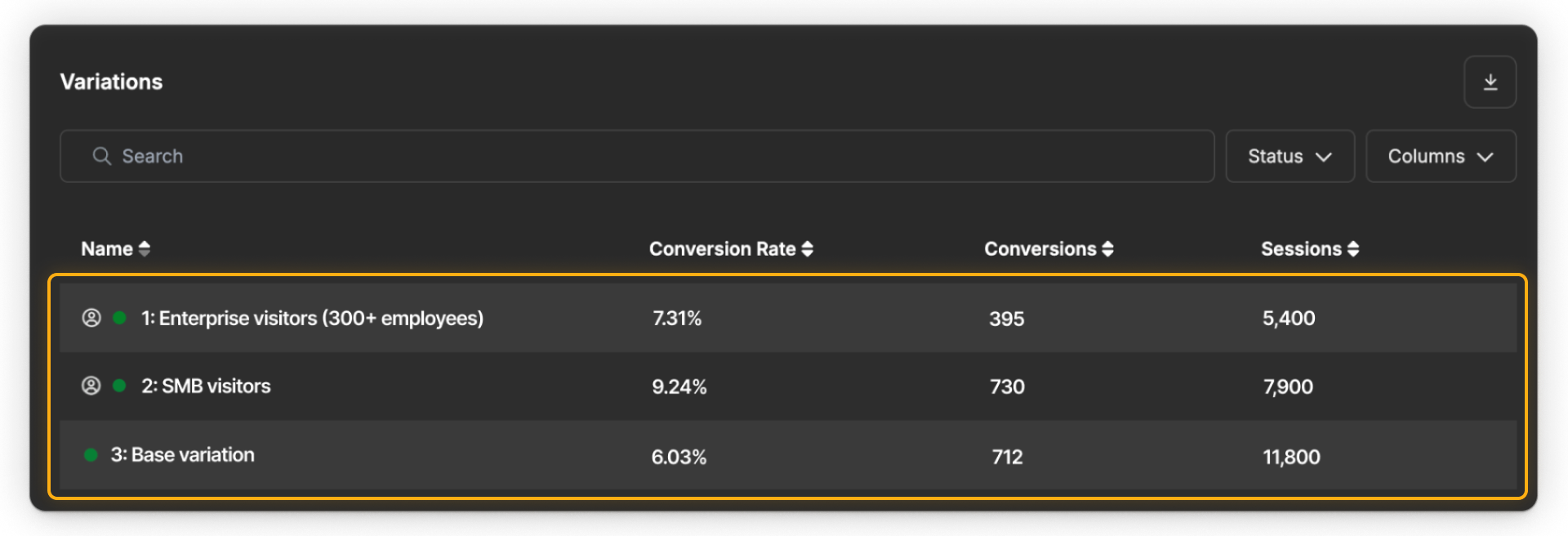
The main metrics are familiar:
Sessions
How many browsing sessions were attributed to the variation
Conversions
How many times visitors completed the action tracked by the selected goal
Conversion rate
The number of conversions divided by the sessions associated with that variation
Users
The number of unique visitors who saw the variation
The report reflects the selected date range and goal. If the personalization tracks multiple goals, the target goal appears by default, and you can switch goals to explore other outcomes.
For example, you might see:
- Enterprise variation: 7.31% conversion rate
- SMB variation: 9.24% conversion rate
- Base variation: 6.03% conversion rate
At first glance, the SMB variation has the highest conversion rate. But unlike a traditional test, that doesn’t mean the SMB variation is the “winner.”
The Enterprise, SMB, and base experiences are being shown to different groups of visitors, so their conversion rates aren’t a head-to-head comparison.
Don’t treat the base like a control
This is one of the biggest differences between reading a personalization report and reading a traditional test report.
Traditional test
The base and variations are shown to comparable eligible traffic so you can compare performance.
Manual personalization
Audience rules determine which experience each visitor receives.
- Enterprise visitors receive the Enterprise variation.
- SMB visitors receive the SMB variation.
- Visitors who don’t match either personalized audience receive the base.
.png)
That means the base is a fallback experience, not a control group for the Enterprise and SMB variations.
Differences in conversion rate may reflect differences between the audiences themselves, not just the experiences they saw.
For example, SMB visitors might arrive with stronger intent than Enterprise visitors. A higher SMB conversion rate doesn’t automatically mean the SMB experience would perform better for Enterprise visitors too.
Evaluate each personalized experience in the context of the audience it was designed to serve.
Use audience insights for more context
Audience insights work much like they do in a traditional test: they help you see how performance varies across additional visitor signals.

For example, you might see how the Enterprise, SMB, and base experiences performed across:
- Paid search
- Organic search
- Direct navigation
These patterns can help you spot something worth investigating further.
Maybe the Enterprise experience performs particularly well for visitors arriving from paid search, while the SMB experience is strongest for visitors arriving from email.
Treat these insights as additional context, not as proof that one personalized variation is better than another.
Look at performance over time
Just like in a traditional test, a single conversion rate gives you a snapshot. The performance chart shows how results changed over time.
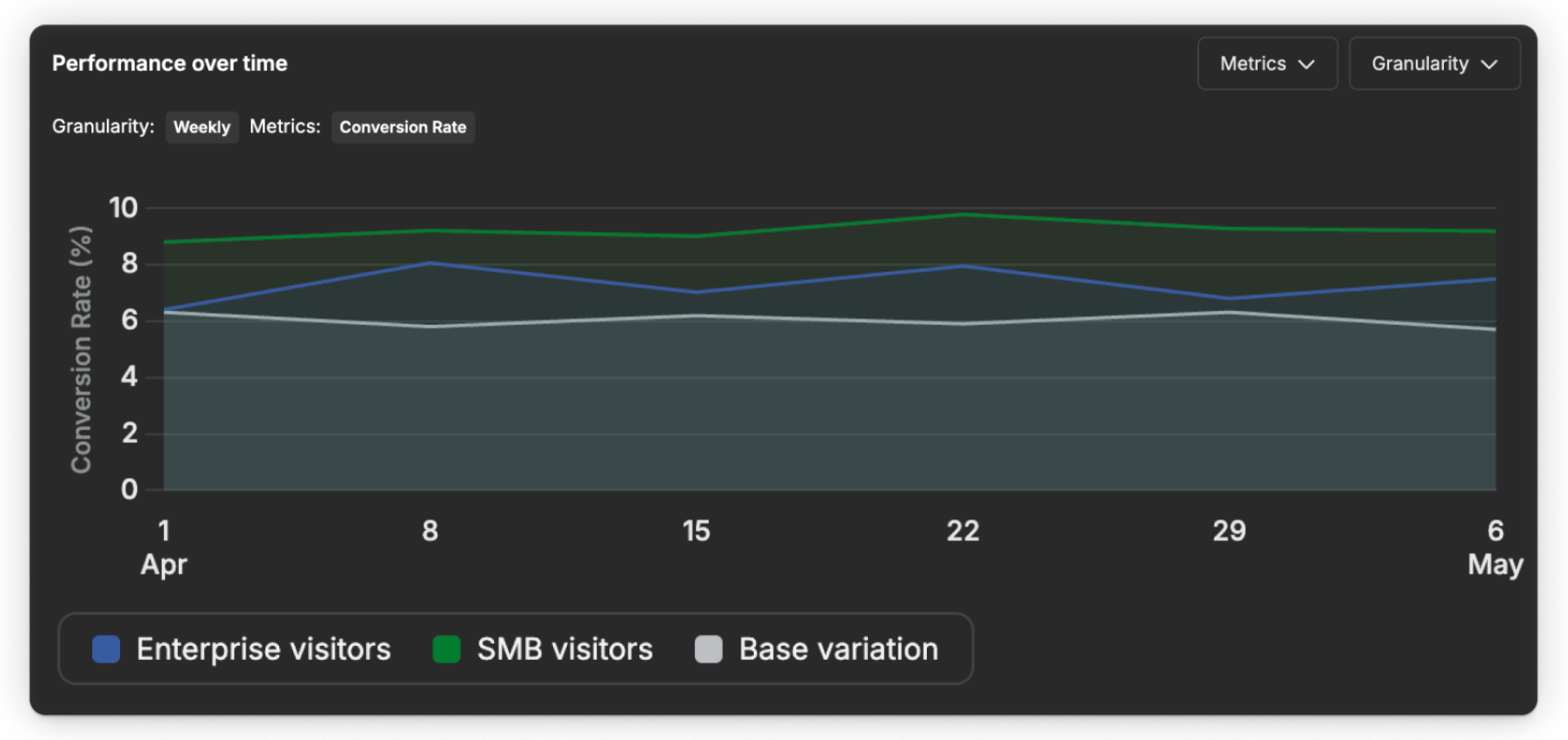
Use it to look for patterns:
- Is Enterprise performance relatively stable?
- Is SMB performance improving or declining?
- Did one audience change during a campaign or promotion?
- Did the base change during the same period?
The chart helps you understand patterns behind each audience’s result, not just its current conversion rate.
Read traffic allocation differently
Traffic allocation is another place where a personalization report needs a different interpretation.
Test
In a traditional test, traffic follows the split you configured.
Personalization
In a manual personalization, you shouldn’t expect an even split.
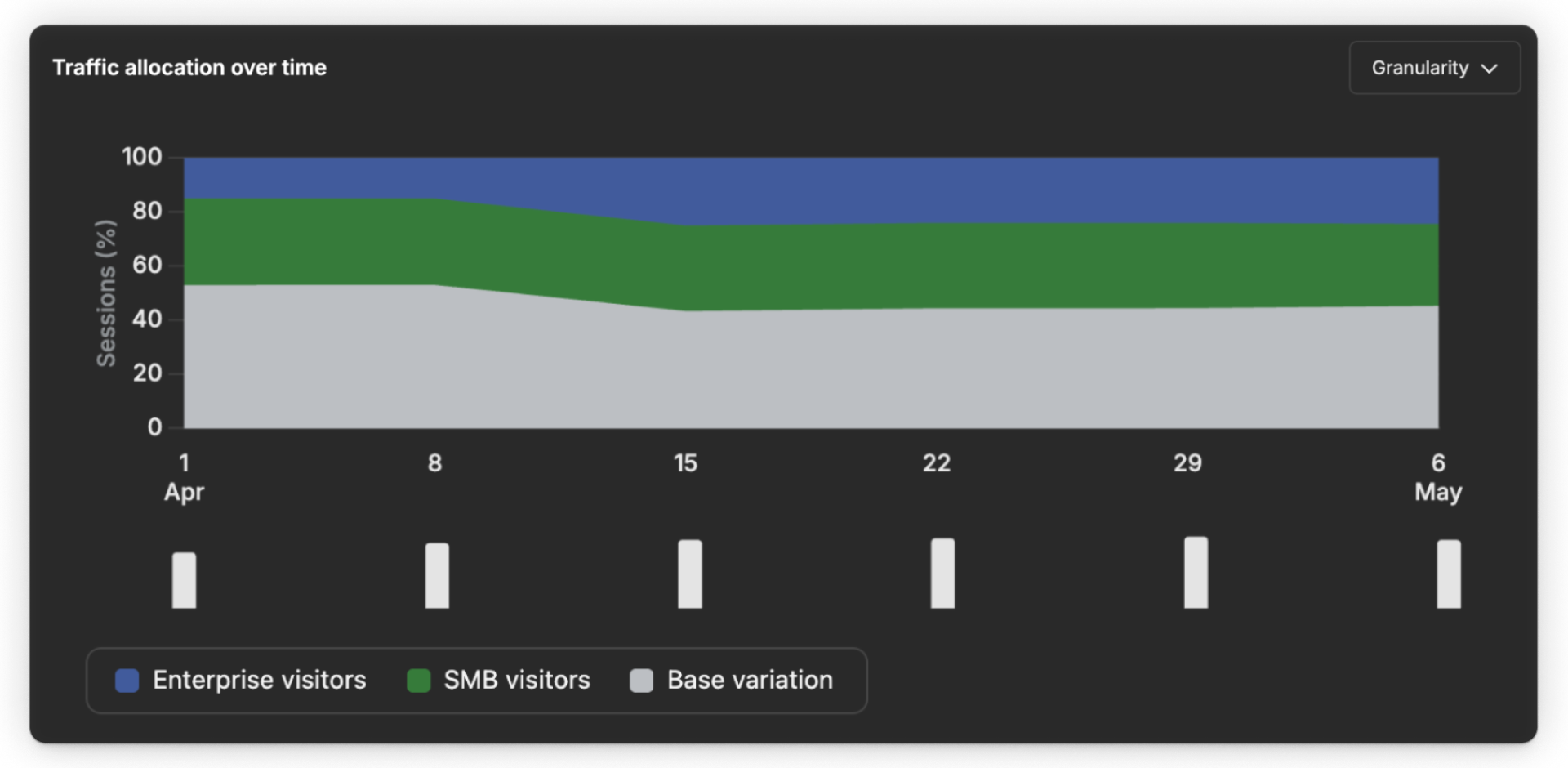
Traffic depends on how many visitors match each audience. As the mix of Enterprise, SMB, and unmatched visitors changes, the amount of traffic going to each experience can change too.
For example, if more Enterprise visitors arrive during a campaign, the Enterprise variation may receive a larger share of traffic during that period.
That doesn’t mean Optimize is favoring the Enterprise variation. It simply reflects which audience visitors matched.
Check account engagement when it’s available
Account engagement works the same way it did in the traditional test report: it can provide additional company-level context when that data is available.

This can be especially useful when reviewing an Enterprise personalization, where understanding engagement from known companies may add useful context.
If no matching account data is available for the selected date range, this section may be empty.
Decide what deserves attention
A manual personalization report is primarily observational. You’re using it to understand whether each audience is still receiving an experience that makes sense for it.
As you review the report, focus on three things:
- Traffic: Is each audience receiving enough traffic to give you a useful read?
- Performance: Is Enterprise, SMB, or base performance stable, improving, or declining?
- Relevance: Do the audience definitions and personalized experiences still make sense for the visitors receiving them?
From there, you might:
Keep
When the personalization still serves its audience well.
Adjust
When the audience or experience needs refinement.
Investigate
When you spot an unexpected pattern worth understanding first.
Retire
When the personalization is no longer useful or relevant.
The key is not to turn the report into a test it wasn’t designed to be. You’re not looking for one overall winner.
Ready to keep going?
Continue on to the next lesson to learn how to interpret AI Optimize results, where variation delivery adapts over time and the Strength signal helps you understand what the system is learning.