AI Optimize reports
AI Optimize reports
By now, the report itself should look familiar.
You’ll still see many of the same sections and metrics from traditional tests and manual personalizations, including the variations table, audience insights, account engagement, performance over time, traffic allocation over time, etc.
What changes is how the optimization works.
Traditional test
Compare variations against the same goal to understand which performs best overall.
Manual personalization
Deliver specific experiences to specific audiences.
AI Optimize
Adapt variation delivery over time as the system learns.
That means you’re not waiting for one permanent winner. Instead, you’re looking at how the system’s learning develops over time.
The new signal that helps you interpret that learning is Strength.
We have the base variation, plus 4 variations we are experimenting with:
- Variation A: Outcome headline
- Variation B: Speed headline
- Variation C: Social proof headline
- Variation D: Simplicity headline
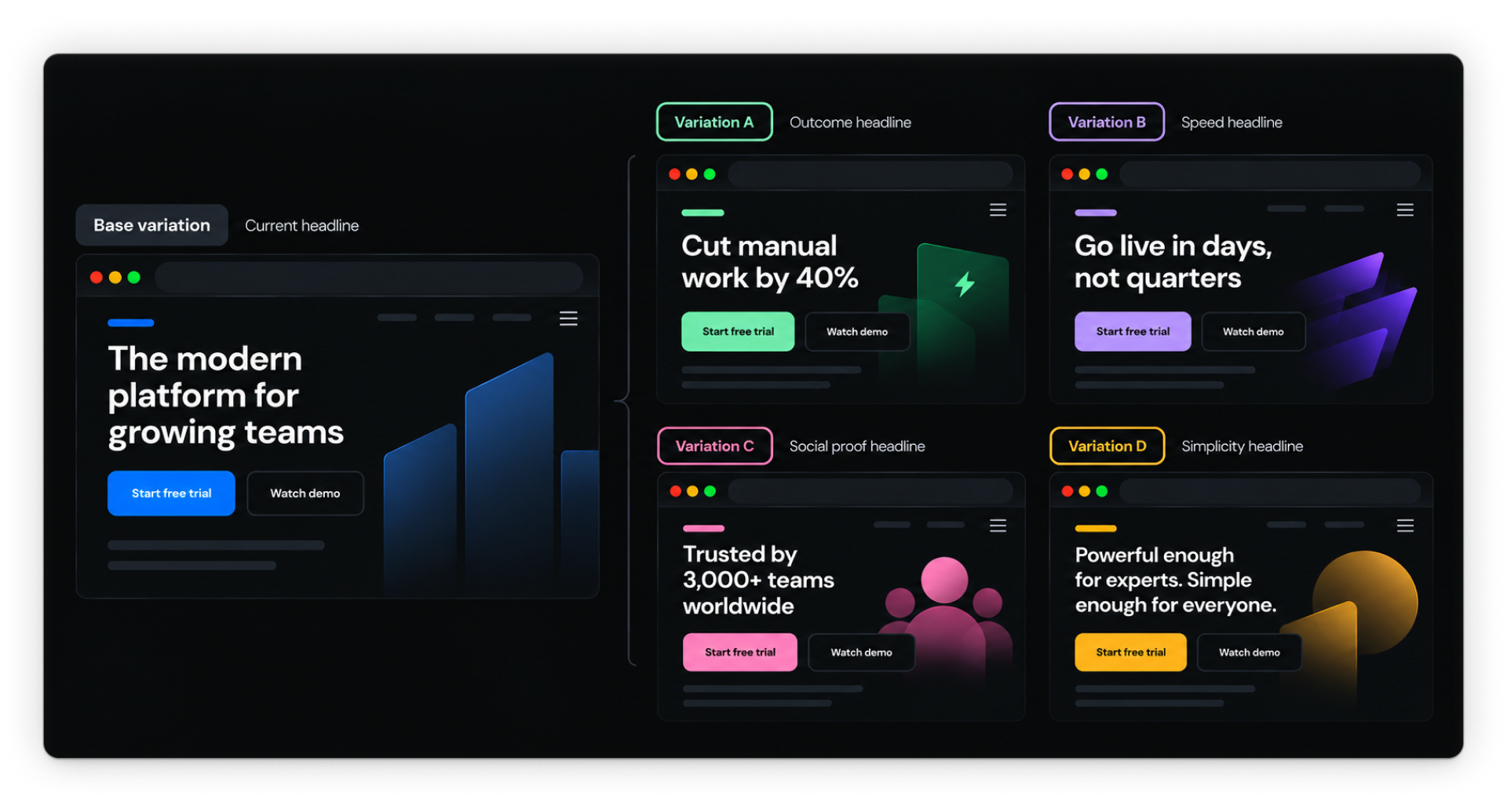
The target goal is Start free trial click.
Once the optimization is running, all five experiences appear together in the report so you can compare performance and follow how AI’s learning develops.
.png)
Start with Strength
The Strength metric helps you understand how a variation is performing relative to the base based on the results collected so far.
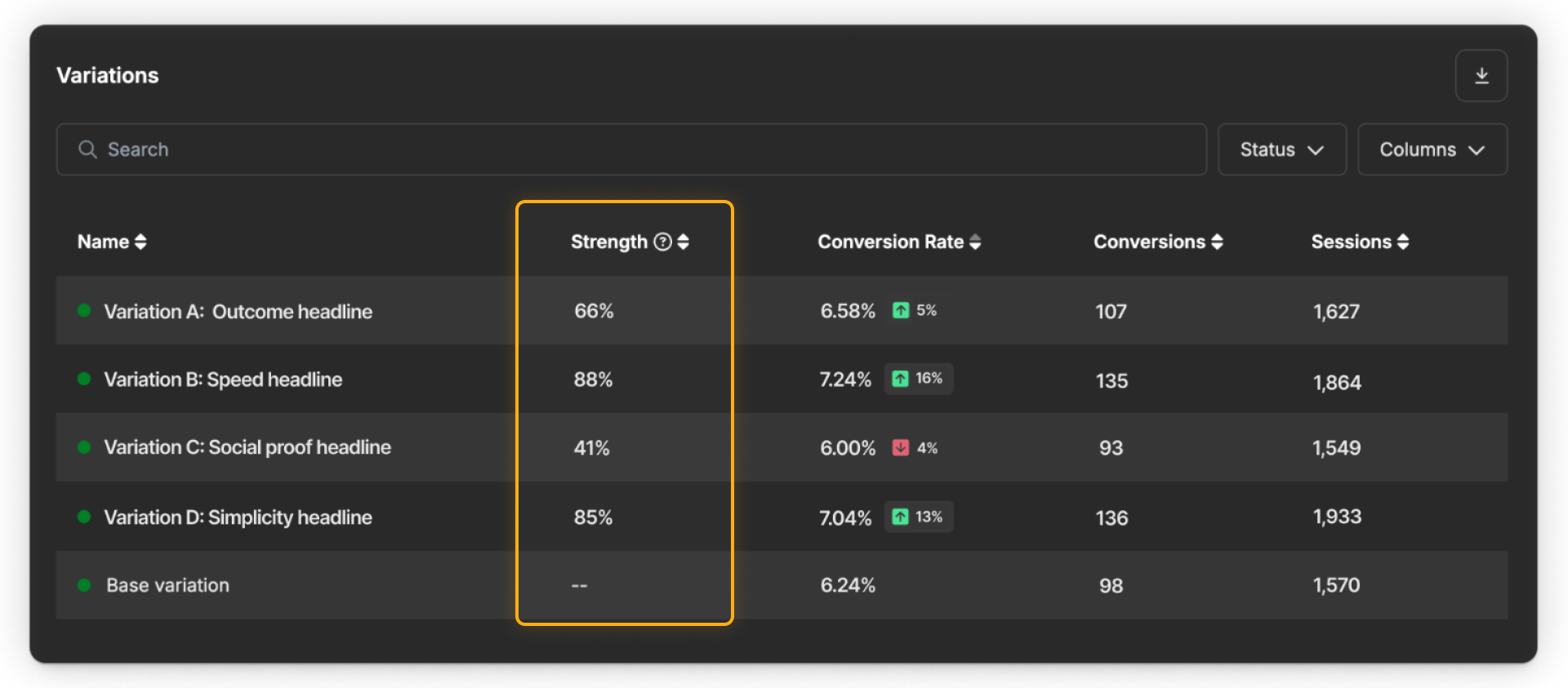
All new variations start at 50% Strength. As Optimize collects enough evidence, that value can move higher or lower.
Higher Strength ↑
There’s stronger evidence that the variation will continue to outperform the base.
Lower Strength ↓
There’s stronger evidence that the base will perform similarly or better.
Tip: Webflow suggests treating values around 70–100% as stronger-performing ideas worth leaning into, while values around 0–30% may be candidates to pause or rethink.
Strength is relative to the base. It isn’t a conversion rate, and it doesn’t mean a variation has become a permanent winner.
Strength needs enough conversion data. Strength begins calculating only after both the variation and the base have recorded at least 10 conversions. Until then, a variation may remain at the default 50%.
Early results can change
Shortly after launch, the report can be noisy.
A variation that looks weak at first may improve as more data comes in. A variation that starts strong may fall back.
In our example, Variation D: Simplicity headline begins near the bottom early on, then becomes one of the strongest-performing ideas as the optimization gathers more data.
.png)
That’s why an early snapshot should be treated as exactly that: an early snapshot. Don’t react to a temporary lift or drop in isolation.
Read Strength with performance
Strength makes more sense when you read it alongside the familiar performance metrics. A useful way to read the two signals is:
Conversion rate
Conversion rate tells you what has happened.
Strength
Strength helps you interpret the evidence behind that performance.
A high conversion rate alone doesn’t guarantee high Strength.
Optimize also needs enough evidence to determine whether the difference from the base is meaningful and likely to persist. As more data comes in, some variations may build Strength while others lose it.
Read traffic allocation differently
Traffic allocation is where AI Optimize becomes visibly different from both report types you’ve already explored.
.png)
At launch, traffic may be distributed fairly evenly. As AI learns, that can change.
One variation may receive more traffic while another receives less. That doesn’t necessarily mean a variation has “won.” It means delivery is adapting as Optimize continues learning.
The difference across optimization types is:
- Traditional test: Traffic follows the split you configured.
- Manual personalization: Traffic reflects which audiences visitors match.
- AI Optimize: Traffic can adapt based on what the system is learning.
Look at Strength, performance, and traffic together
No single metric tells the whole story. Use the report to read three signals together:
Strength
How strong is the evidence for the variation relative to the base?
Performance
How are conversion rates changing over time?
Traffic
How is delivery shifting as AI learns?
Together, these signals can reveal patterns like:
- A variation building Strength as its performance stays consistently above the base
- A promising variation losing Strength as more data comes in
- Traffic shifting toward ideas that continue to perform well
- A weaker idea receiving less traffic over time
Use audience insights for context
Audience insights work much like they did in the previous reports.
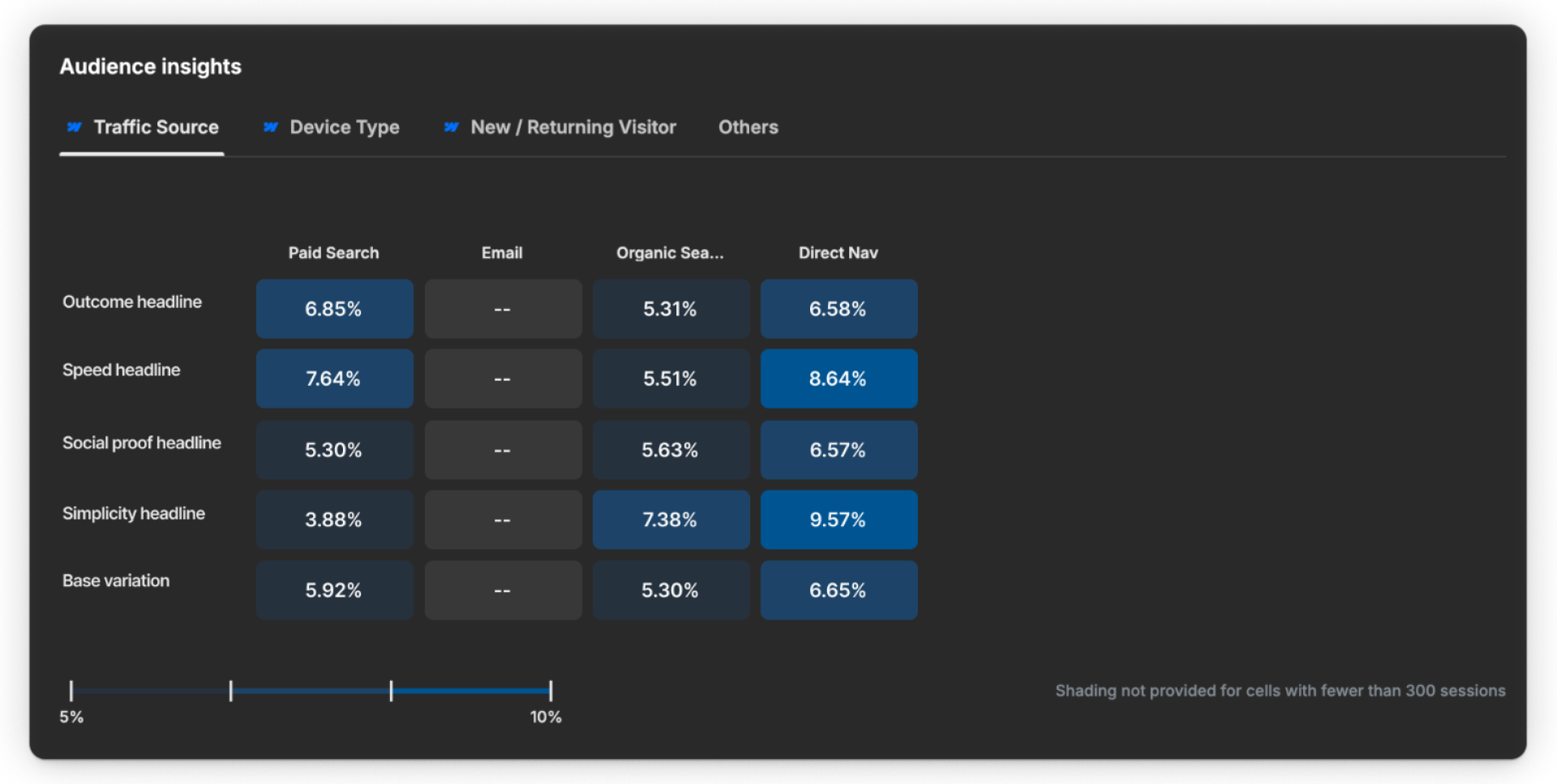
Use them to explore whether different ideas appear to resonate with different visitor groups or traffic sources.
For example, one headline might perform especially well for Paid Search visitors while another works better for Organic Search.
That helps explain why AI Optimize may continue keeping multiple variations in the mix.
Audience insights are context for understanding the result, not manual rules telling AI who should receive each variation.
Decide what deserves attention
As you review an AI Optimize report, focus on three things:
- Strong ideas: Which variations are building Strength and showing sustained performance?
- Weak ideas: Which variations continue to show weak signals as more evidence comes in?
- New patterns: What messaging, experiences, or audience responses are worth exploring next?
From there, you might:
Keep
Let strong ideas continue gathering evidence.
Add
Create new variations that build on promising concepts.
Rethink
Refine ideas that continue to show weak signals.
Retire
Remove variations that are no longer useful to keep in the mix.
Use those patterns to decide what to keep, rethink, or try next.
Ready to keep going?
Next, you’ll zoom out from individual optimizations and learn how to monitor optimization performance across your site.