Set up your SEO tracking
Build your foundation with basic tools
Before you optimize pages or polish metadata, you need a solid measurement foundation. SEO becomes far easier and far more meaningful when you can see how search systems discover your site and how people interact with it.
Think of this lesson as setting up your SEO control center. Once these tools are in place, everything else you do in this course becomes more intentional, measurable, and fixable.
Some of the terms and tools in this lesson might feel advanced, and that’s completely normal. You don’t need to set up everything perfectly today or understand every feature you saw. At this stage, your only goals are to:
- Know what these tools are
- Understand why they matter
- Get them in place so they can start collecting data
We’ll walk through key settings including sitemaps, indexing rules, and page-level SEO in upcoming lessons.
Google Search Console: how Google sees your site
Google Search Console (GSC) is one of the most important tools in your SEO toolkit. It is a free tool that helps you monitor, maintain, and troubleshoot your site’s presence in Google Search. It shows how Google crawls, indexes, and surfaces your site in search results. In other words, it’s your direct line of communication with Google.
Think of GSC as your early warning system and your performance dashboard. GSC helps you understand:
- Which pages are indexed and which aren’t
- Crawl issues that might prevent discovery
- Search queries that bring visitors to your site
- How often your content appears in rich results
- Click-through patterns and performance trends
If Google can’t index your site correctly, it can’t rank — and it definitely won’t show up in advanced result types like snippets or AI-generated summaries.
You’ll need to submit your sitemap to GSC, but don’t worry about that now. We’ll cover sitemaps and indexing settings in more detail in an upcoming lesson.
Set up analytics to understand user behavior
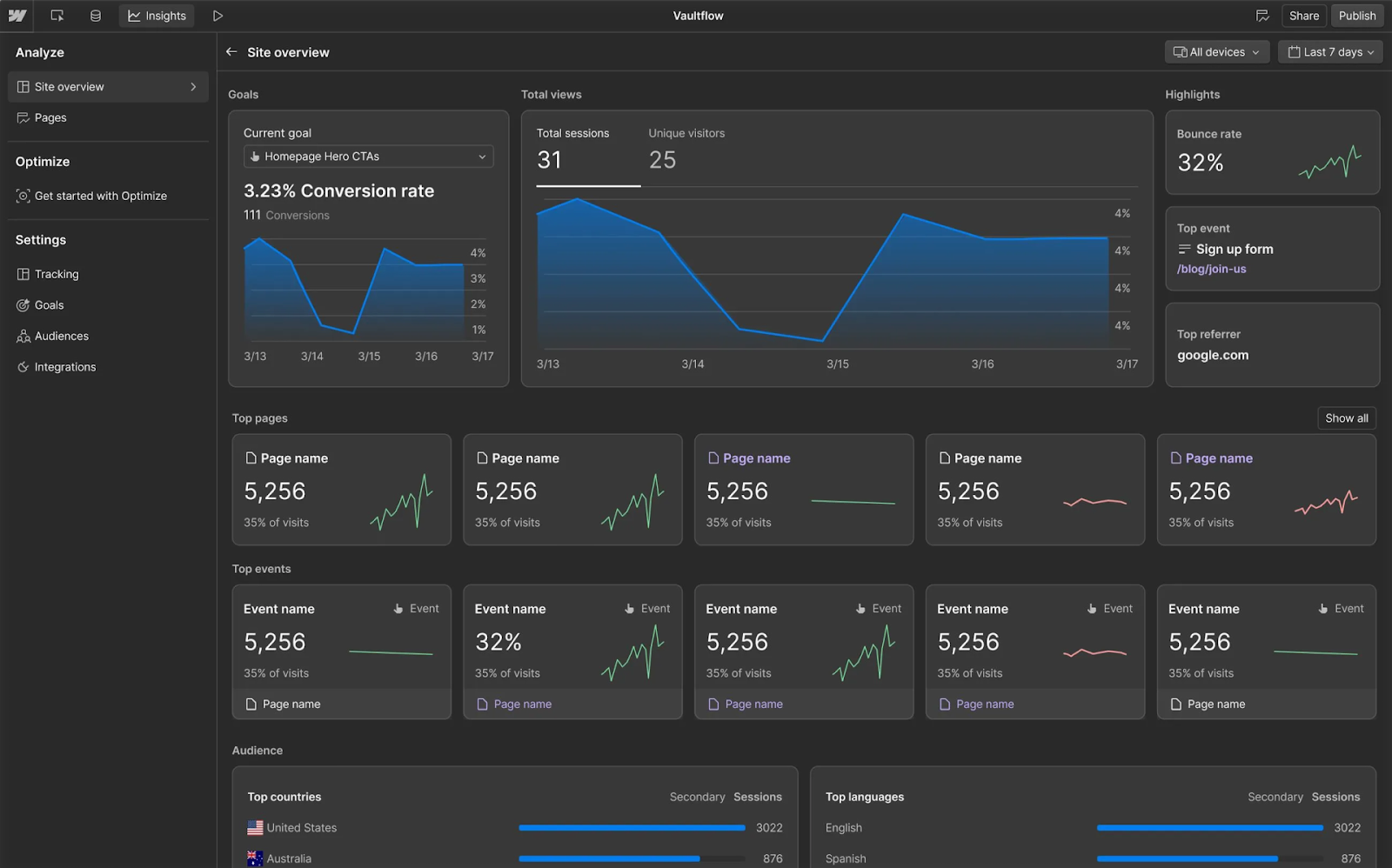
Once users find your site, analytics tools help you understand what they do next — which pages they visit, how long they stay, and where they drop off. These insights help you make smarter SEO decisions.
Analytics help you:
- See which pages attract organic traffic
- Understand engagement and user behavior
- Identify which content converts
- Spot problem areas or confusing UX patterns
You can use Webflow Analyze for simple, built-in reporting, or tools like Google Analytics (GA4) for deep behavior insights.
At this stage, you don’t need to master analytics — you just need the tools in place before traffic arrives.
Google Business Profile: essential for local visibility
If your business has a physical location or serves customers in specific areas, Google Business Profile is a crucial part of your search presence. It can boost visibility in:
- Local search results
- Google Maps
- “Near me” searches
A well-maintained profile sends strong trust signals to search systems, especially around accuracy, reputation, and activity.
Google Tag Manager: manage scripts without slowing down your site
Google Tag Manager (GTM) is a tool that lets you add and manage analytics and tracking scripts on your site without repeatedly editing your Webflow project. It helps improve page speed and SEO performance by reducing the number of scripts that load directly on your Webflow site.
You connect GTM to your Webflow site once. After that, tools like Google Analytics, conversion tracking, or performance measurements can be added and updated from Google Tag Manager without pasting new code or republishing your site each time.
GTM isn’t required to get started with SEO, but it becomes valuable as your site grows. It helps you:
- Keep tracking scripts organized in one place
- Avoid slowing down your site with unnecessary or duplicate scripts
- Control when tracking runs, so measurement doesn’t hurt performance
- Add new tracking later without reworking your Webflow setup
In short, GTM helps keep your site clean, fast, and measurable as your SEO needs evolve.
How these tools work together
When you combine Google Search Console, analytics, Google Business Profile, and Google Tag Manager, you get a complete picture of your search presence:
- How search engines discover and understand your site
- How visitors find you
- How they behave once they arrive
- Whether your SEO improvements actually work
Everything you’ll optimize later (e.g. site structure, metadata, performance, content) depends on the visibility these tools provide.
Without measurement, SEO is guesswork. With measurement, it’s a repeatable process.
Additional tools like SEMrush, Ahrefs, Lighthouse, or Screaming Frog can offer deeper insights into keywords, technical issues, or competitive research, but you don’t need them to succeed with SEO in Webflow. We’ll show you where these tools fit into ongoing SEO audits later in the course.
Feeling good?
With your tracking and measurement tools in place, you’re ready to structure your site in a way that’s easy for search systems to crawl and easy for people to navigate.
In the next lesson, we’ll design a clear, scalable site structure using Webflow’s navigation tools, URL patterns, internal linking, and redirects.