See if Webflow Cloud fits
A project can include custom code without needing Webflow Cloud. The deciding factor is what the experience needs to do, store, or connect to after someone interacts with it.
Know your other options
Webflow Cloud is one way to run a coded experience, but it isn't the only option. Before choosing it, consider whether one of these approaches can handle the complete job:
Native Webflow features
Use Webflow CMS, forms, components, and other built-in features when the experience is mostly content-driven and doesn't require a separate application.
AI code components
Add custom React-based interactions, such as quizzes, calculators, and multi-step forms, directly to a Webflow site. They don't provide databases, authentication, or secure storage for API credentials.
Existing service or integration
Connect a purpose-built tool when it already handles the job, like scheduling appointments, processing payments, or sending form submissions.
External app infrastructure
Consider another hosting or backend platform when the project requires unsupported technology, specialized infrastructure, or long-running processing.
A project can use more than one of these. The goal is to identify which part, if any, needs Webflow Cloud.
What changes the answer?
Imagine you're adding a style quiz to an interior design site. Visitors answer a few questions, and the quiz recommends a style based on their responses.
At first, that is the complete experience. The questions, scoring, and result can all run inside an AI code component because it can use custom React code to process the answers and display the result on the page.
Then you decide to show visitors something like, "Three other people got this result today" or "Your style is popular with other visitors." To make that statement accurate, the quiz needs to save each result and compare it with results from other visits.
Now the results need to be saved across visits. A key-value store keeps each piece of information under a simple label. Here, the style name can be the key, and the number of matching results can be the value.
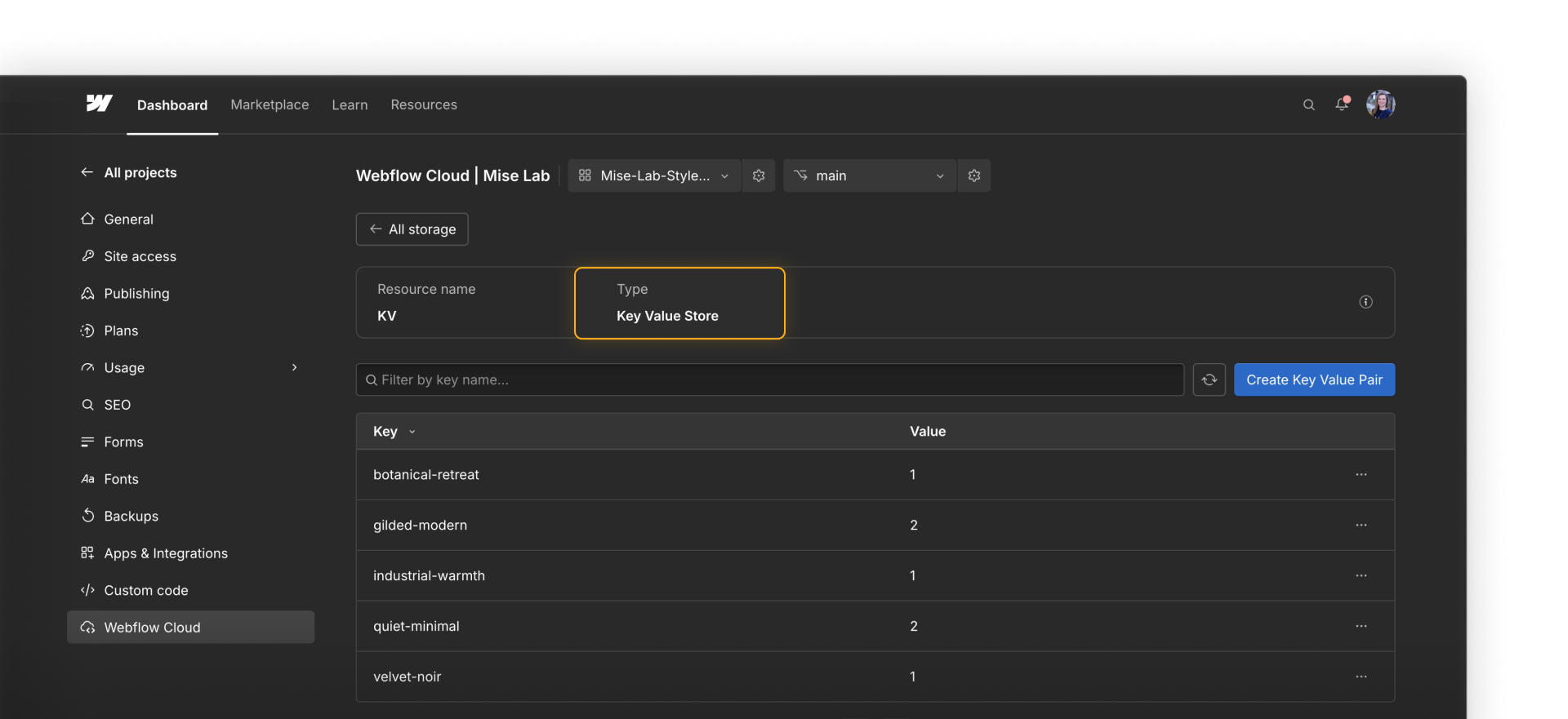
The Cloud app reads and updates that value as people complete the quiz. In this project, that shared storage is what makes Webflow Cloud the right fit.
Webflow employee Diego Rangel wanted guests to share photos throughout his wedding celebration. With Webflow Cloud and an AI coding tool, he built an app that accepted uploads from guests’ phones and streamed the photos to screens around the venue in real time.
By the end of the night, guests had shared more than 500 photos.

Compare other projects
There are plenty of other reasons you might decide if Webflow Cloud is or isn’t the right fit.
The next examples point in opposite directions. The listings project shows when native Webflow features may not be enough. The media project shows when part of the work may need to run outside Webflow Cloud.
Keep listings current
Our fictional real estate company already manages its agent information in Airtable. Webflow CMS could display those profiles, but someone or an integration would need to copy each change into Webflow and keep both versions up to date.
Instead, a Cloud app can request the current data from Airtable and use it to power the directory’s search experience. Webflow CMS can still manage editorial content, such as neighborhood guides.
.png)
Process large media batches
A media team needs to upload hundreds of videos, process them in the background, and generate several versions of each file. That work may exceed Webflow Cloud's request and compute limits.
In this case, dedicated processing infrastructure is the better fit for that part of the project. Webflow or a Cloud app could still present the finished results.
Check your project
Before committing to Cloud, ask:
- Could native Webflow features or an AI code component handle the complete experience?
- Does the app need shared data, authentication, server-side logic, or a protected API connection?
- Does it use a supported framework and runtime?
- Does its work fit within the current Webflow Cloud limits?
- Who will maintain the code, integrations, deployments, and usage?
- Should the app belong to a Webflow site or operate on its own?
No single answer determines the fit. Look for the smallest setup that meets the project's requirements and can be maintained after launch.
Onward.
Continue to the next lesson to get your app ready to deploy.